Why My AI Agent Stopped After 4–5 Iterations
While working on Agent Loop, my Python runtime for locally hosted LLMs, I ran into a frustrating problem: the agent would start a task, make a few tool calls, and then stop after four or five iterations.
The model's response contained finish_reason: length.
My first suspicion was the model or the inference server. I was running a local setup, after all, and long agent sessions put quite different demands on an LLM than a single chat response. But the problem turned out to be in the runtime's token configuration.
The setup
I was testing with GLM-4.7-Flash through a local OpenAI-compatible Chat Completions endpoint. Agent Loop handles the execution cycle: it sends the conversation to the model, processes tool calls, appends tool results, and continues until the task is finished or the runtime stops.
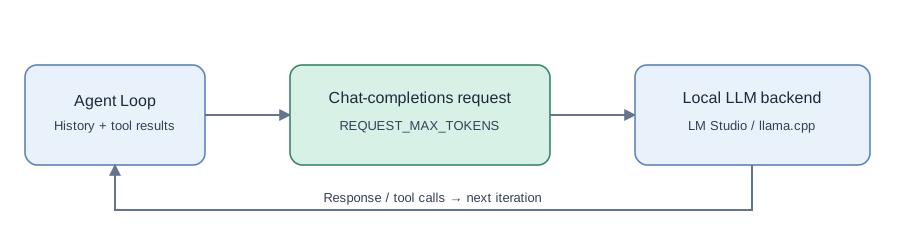
The important detail is that an agent task is not one model request. Every iteration sends another request, often with a larger conversation history and additional tool output.
That means the runtime has to manage more than one token limit.
The mistake
In my initial implementation, I effectively used the overall conversation budget as the maximum output allowance for each individual request:
# Simplified illustration of the old configuration
max_tokens = 131072
The value 131072 belonged to the session-level budget. It should not have been passed directly as the generation limit for every Chat Completions request.
A high max_tokens setting does not mean the model will generate that many tokens. It specifies an upper bound. But the inference server may validate or reserve room for that allowance against the available context, and an unrealistic limit makes context handling harder to reason about.
I had mixed together three separate concepts:
- Model context window — the maximum number of tokens the model/backend can handle in a request, including input and generated output.
- Per-request output limit — the maximum number of tokens the model is allowed to generate for one response.
- Conversation budget — the runtime's application-level limit for accumulated conversation state, used to decide when to compact or stop.
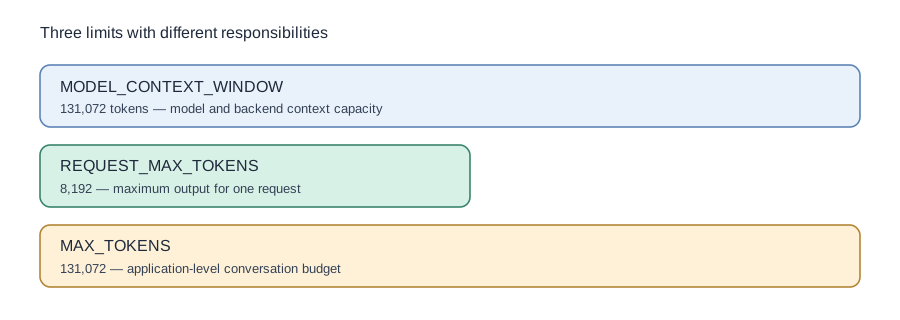
The model's context capacity and the application's conversation budget can have the same configured number, but they still serve different purposes.
Fixing the configuration
I separated the settings instead of reusing one number everywhere:
MODEL_CONTEXT_WINDOW = 131072
REQUEST_MAX_TOKENS = 8192
MAX_TOKENS = 131072
COMPACT_THRESHOLD = 0.8
These are the values from the debugging setup, not universal defaults for every model.
The API request now uses the per-request limit:
# Simplified request configuration
max_tokens = config.REQUEST_MAX_TOKENS
Meanwhile, the runtime tracks the conversation budget independently and can compact the history as it grows.
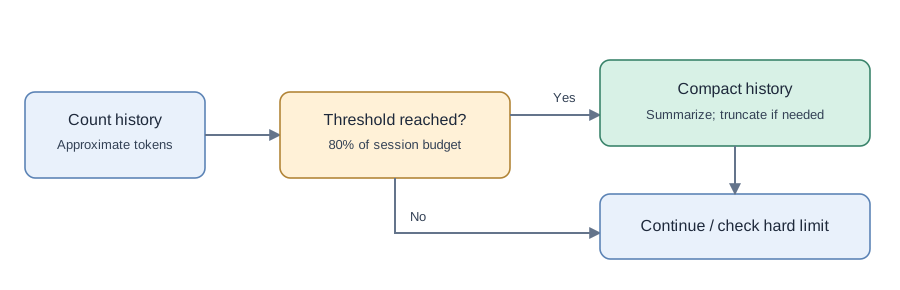
This separation matters even if the model supports a large context window. A request still needs enough room for its input, generated response, and any backend-specific overhead. Compaction helps reduce accumulated history; it does not magically increase the context window configured in the inference server.
What the error actually told me
finish_reason: length was a useful clue, but not a complete diagnosis.
It tells you that generation stopped because of a length-related limit. By itself, it does not tell you whether the problem is the requested output cap, the available context, the server's configuration, or the way your application builds requests.
The useful debugging step was to inspect the outgoing request parameters, rather than assume that the model was simply unable to continue.
For an agent loop, I would now check:
- The actual context window configured in the inference backend.
- The size of the conversation and tool results sent with each iteration.
- The
max_tokensvalue attached to each model request. - The runtime's own conversation-budget and compaction decisions.
Those numbers need to agree with each other, but they should not be represented by one shared setting.
After the change
Before the fix, my test runs commonly stopped after about 4–5 iterations. With the limits separated, I observed runs reaching 20–50+ iterations in some development scenarios.
This is not a benchmark or a promise that the agent can complete any 50-step task. The result depends on the prompt, model, tool output sizes, context configuration, and inference backend. It does show that the earlier stopping point was not an inherent four-iteration limit of the model.
What I took away
I started by debugging what looked like an LLM problem and ended up fixing an orchestration problem.
The lesson was simple: context capacity, per-request generation limits, and conversation lifetime are different things. In an agent runtime, they should be configured and monitored separately.
This is one of those small implementation details that is easy to overlook in a short chat demo, but becomes obvious once the model is expected to work through a longer sequence of tool calls.
The code is available in Agent Loop on GitHub. For an overview of the runtime itself, see Building Agent Loop: A Local-LLM Agent Runtime in Python.