Building Agent Loop: A Local-LLM Agent Runtime in Python
AI coding tools are useful, but I wanted to understand and control the part between a model response and a real action: the agent loop itself. What decides whether to call a tool? How are tool results returned to the model? What happens when a task takes dozens of iterations, and how can a local model keep working without exhausting its context window?
That experiment became Agent Loop, an open-source Python framework for running tool-using agents against locally hosted language models. It supports configurable agent personas, skills, shell and filesystem tools, MCP (Model Context Protocol) integrations, session persistence, response caching, and interactive or one-shot execution.
The interesting part was not writing another chat client. It was building a small, understandable runtime and then debugging the failures that appear only when a model starts taking actions repeatedly.
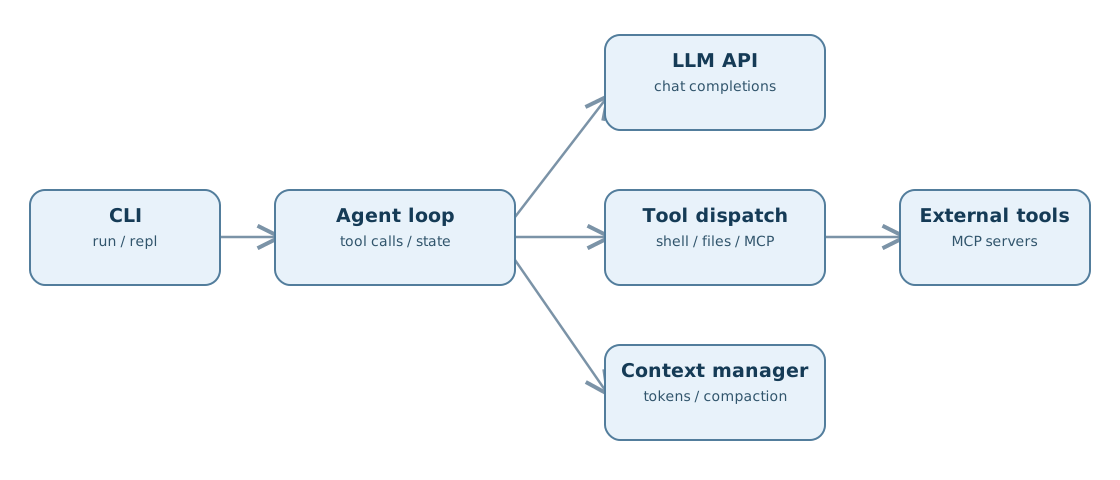
Why build another agent runtime?
I had already been experimenting with local models in software-development workflows, including spec-driven development with bgpd-simple. Those experiments made me interested in the execution layer rather than only the model or the prompt.
An agent is more than a chat completion. It needs to maintain state, expose tools in a format the model understands, validate and dispatch tool calls, feed results back into the conversation, and decide when to stop. For long-running tasks it also needs to manage a finite context budget.
My goals for Agent Loop were deliberately practical:
- Run primarily against local inference servers, without requiring an Anthropic or OpenAI cloud account.
- Keep the agent loop, tools, and model-serving backend separate.
- Define reusable agents, skills, and project-specific instructions.
- Connect external capabilities through MCP.
- Support both an interactive terminal session and a one-shot command.
- Make token usage and context compaction explicit rather than hiding them behind an SDK.
This is a personal engineering project, not a claim to replace established agent frameworks. Its value to me is that I can inspect and change the complete control flow.
The execution loop
At a high level, each iteration builds a model request from the current conversation and available tools. The model can return a normal answer or one or more tool calls. When tools are requested, the runtime dispatches them, captures their results, appends those results to the conversation, and calls the model again.
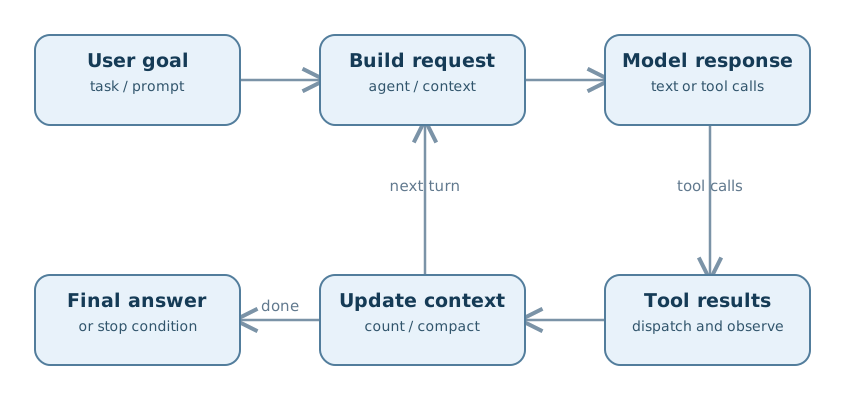
The implementation separates these concerns into modules such as src/loop.py, src/dispatch.py, src/session.py, src/compaction.py, and src/tools/. This makes it easier to distinguish an inference problem from a tool-dispatch problem or a context-management problem.
There are two primary ways to use the CLI:
# Execute one goal
python3 agent_loop.py run "Investigate the failing tests"

# Continue an interactive session
python3 agent_loop.py repl
Named agents and skills let the same runtime handle different tasks without giving every task the same system prompt or tool permissions:
python3 agent_loop.py agent investigator "Find the root cause of this timeout"
python3 agent_loop.py agent code-reviewer "Review src/api.py"
python3 agent_loop.py skill data-analyst "Analyze data/metrics.csv"
The repository includes agents such as coder, investigator, researcher, code-reviewer, and local-assistant. Skills provide narrower capability packages. AGENTS.md can supply repository-specific rules.
Local inference: API protocol is not the model
One source of confusion in local AI tooling is the word compatibility. A server, API protocol, and model are three different components.
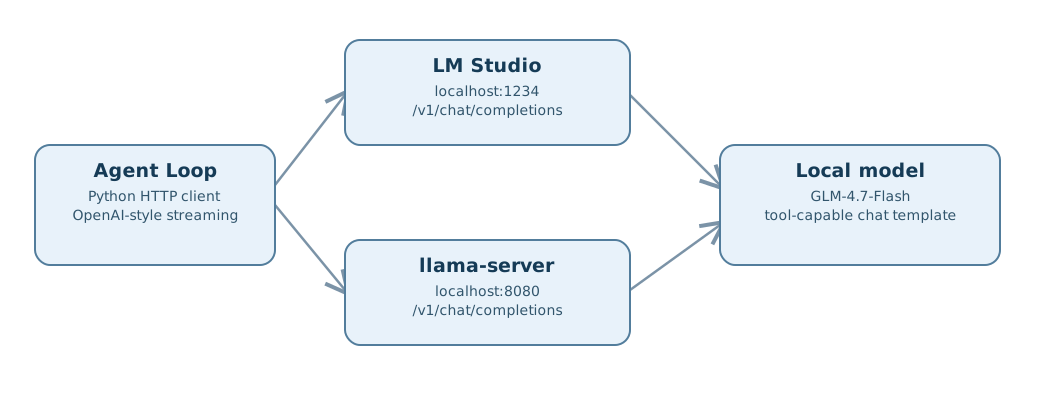
Agent Loop currently sends OpenAI-compatible streaming chat-completions requests, including tool definitions, to the endpoint configured as LM_STUDIO_URL. That variable name is historical: it also points to other compatible inference backends.
My development setup uses GLM-4.7-Flash with LM Studio. The repository also includes an example configuration for llama.cpp and llama-server:
llama-server -m /path/to/GLM-4.7-Flash.gguf \
  -c 131072 --jinja --port 8080

python3 agent_loop.py run "Inspect this repository" \
  --config agent_loop.llamacpp.yaml
The important qualification is that OpenAI-compatible does not mean every endpoint or model will work automatically. Agent Loop expects a particular streaming response and tool-call structure. The inference server, model, and chat template must produce that structure consistently.
LM Studio may also expose an Anthropic/Claude-compatible API, but Agent Loop itself does not directly implement the Anthropic Messages API. It does not need a hosted Claude model to run.
MCP: extending the runtime beyond built-in tools
Built-in shell and filesystem operations are useful for local development. MCP provides another integration boundary: external servers can expose tools without requiring each integration to be hard-coded into the agent loop.
The project uses mcp_servers.json to describe MCP servers, including npm-based tools such as Context7. Those npm-based integrations require Node.js, but the Python agent runtime itself does not.
This separation matters operationally. The model sees a set of tool schemas; the runtime controls how the requested tools are executed. Tool access is not equivalent to permission to run arbitrary commands. Agent Loop exposes allowlists and an explicit --allow option, which skips approval prompts. I use broad access only in trusted environments, especially when shell execution or filesystem writes are enabled.
The failure that made token management important
During development I encountered a frustrating behavior: the agent would stop after approximately four or five iterations, reporting finish_reason: length. The model could complete short tasks, but longer workflows terminated much too early.
The underlying configuration mixed together two different limits. The total conversation budget was set to 131,072 tokens, and that same value had been used as the per-request maximum output. A session-wide budget is not a sensible default for a single completion. This did not mean the model literally generated 131,072 tokens every time; it meant the request advertised an excessively large output allowance relative to the available context.
The fix was to separate the relevant controls:
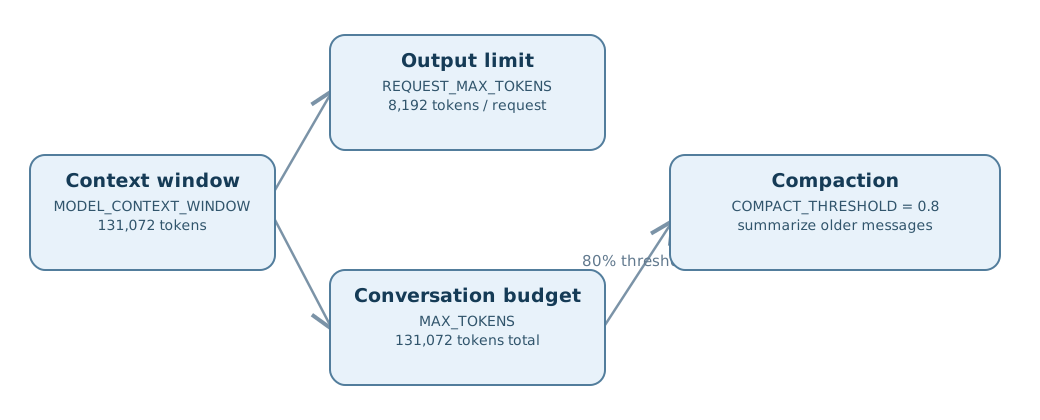
| Setting | Purpose | Development configuration |
|---|---|---|
MODEL_CONTEXT_WINDOW | Actual model context capacity | 131,072 |
REQUEST_MAX_TOKENS | Maximum output for one request | 8,192 |
MAX_TOKENS | Total conversation budget | 131,072 |
COMPACT_THRESHOLD | When to compact history | 0.8 |
With the output limit separated from the session budget, development tests observed 20–50+ iterations rather than stopping after four or five. These are observations from the development setup, not guaranteed iteration counts or a controlled model benchmark.
Compaction is a fallback, not unlimited memory
As conversation history grows, the runtime tracks its approximate token usage. At the configured threshold, it tries to summarize older messages while preserving the system prompt and recent messages. If summarization fails, a hard-truncation fallback keeps the most recent context.
That design has trade-offs. A summary can lose details, while truncation can lose more. Neither creates an infinite context window. But both are preferable to treating every accumulated tool result as permanently necessary.
It is also important to distinguish context-budget pressure from RAM/VRAM exhaustion. Reducing a per-request output limit may help the former; it will not necessarily make an oversized model fit into GPU memory.
A few engineering lessons
1. Protocol compatibility must be tested at the tool-call boundary. A successful plain-text completion does not prove that streaming tool calls will be parsed correctly.
2. Agent permissions are part of the runtime design. A tool schema tells the model what it can request; allowlists and approval behavior determine what the runtime will execute.
3. Long-running tasks expose configuration mistakes quickly. The finish_reason: length issue was not obvious from a single request. It appeared when the loop accumulated enough history to make token budgeting matter.
4. Local inference changes the constraints, not the fundamentals. I can control the serving stack and keep prompts local, but I still need reliable tool calling, explicit context limits, and sensible failure handling.
5. Small modules make debugging easier. Separating the CLI, agent loop, dispatch, sessions, MCP integration, and compaction made it easier to isolate the source of a failure.
Try Agent Loop
The source code, configuration examples, agent definitions, and setup instructions are available on GitHub:
github.com/avkghost/agent-loop
git clone https://github.com/avkghost/agent-loop.git
cd agent-loop
pip install -r requirements.txt
Choose a compatible local inference server, configure its endpoint and model, and start with a small read-only task before enabling broader tool access. The project is MIT-licensed.
Agent Loop remains an experimental engineering project. I built it to understand and improve the reliability of local tool-using agents—and to keep that runtime understandable enough to debug when something goes wrong.