Building Cisco-Like Loopback Interfaces on Linux
Cisco routers use loopback interfaces as stable Layer 3 identities. They are independent of physical ports, making them useful for router IDs, routing-protocol endpoints, management addresses, and service IPs. Linux can provide nearly the same functionality without a custom kernel module: use a dummy network interface.
This article explains how dummy interfaces behave, how to route to them, how to use them with policy routing and FRRouting, and how to create one from C using Netlink. It also covers anycast, VRRP, and the cases where a custom kernel driver or a TUN device is actually necessary.
1. Dummy versus loopback: what is actually routable?

Create a dummy device and assign a host address:
sudo ip link add dummy0 type dummy
sudo ip addr add 10.255.0.1/32 dev dummy0
sudo ip link set dummy0 up
ip addr show dummy0
Linux installs a local route for the address, normally visible in table local:
ip route show table local
# local 10.255.0.1 dev dummy0 proto kernel scope host src 10.255.0.1
ping 10.255.0.1 succeeds on the host. This does not mean that packets are physically transmitted through dummy0: packets destined to a local address are delivered by the IP stack. The dummy driver's transmit path discards packets sent out through it.
To reach the address from another machine, that machine or its upstream routers must know a path to the Linux host. For example, if the Linux host has eth0=192.168.1.1:
# On a second machine on 192.168.1.0/24:
sudo ip route add 10.255.0.1/32 via 192.168.1.1
ping 10.255.0.1
The packet arrives on eth0 and is delivered locally because 10.255.0.1 belongs to the host. IPv4 forwarding is not required for this traffic. Forwarding is required only for packets whose destinations are not local and which must traverse the router.
A dummy interface provides a routable local identity, not a virtual wire. Adding
ip route add 10.200.0.0/24 dev dummy0does not make10.200.0.0/24reachable: packets routed out of the dummy device are dropped.
2. Source-based policy routing

Suppose a router has these addresses:
| Device | Address | Role |
|---|---|---|
dummy0 | 10.255.0.1/32 | Stable identity |
eth0 | 192.168.1.1/24 | LAN |
eth1 | 172.16.0.2/24 | ISP 1 |
eth2 | 172.17.0.2/24 | ISP 2 |
To route traffic sourced from the dummy address through ISP 2:
sudo ip route add default via 172.17.0.1 dev eth2 table 200
sudo ip rule add from 10.255.0.1/32 lookup 200 priority 1000
ip rule show
ip route get 8.8.8.8 from 10.255.0.1
The expected lookup selects eth2, with source 10.255.0.1. This only works end-to-end if the upstream network accepts the source address and a return route exists. On multihomed hosts, reverse-path filtering (rp_filter) can also interfere with asymmetric paths.
Linux checks the local-routing rule before ordinary user policy rules, so traffic destined to a locally owned dummy address is ordinarily delivered locally.
3. Stable BGP endpoints with FRRouting

Loopback addresses make good BGP peering endpoints because the session can survive a change in physical path provided another routed path remains available.
Example topology:
| Router A | Router B | |
|---|---|---|
| Physical IP | 192.168.10.1 | 192.168.10.2 |
| Dummy IP | 10.255.0.1/32 | 10.255.0.2/32 |
| ASN | 65001 | 65002 |
On each router, create the appropriate dummy interface. Before starting the BGP session, provide underlay reachability:
# Router A
sudo ip route add 10.255.0.2/32 via 192.168.10.2

# Router B
sudo ip route add 10.255.0.1/32 via 192.168.10.1
Install FRRouting (sudo apt install frr on Debian/Ubuntu), enable bgpd in /etc/frr/daemons, and configure it with vtysh.
Router A:
configure terminal
router bgp 65001
 bgp router-id 10.255.0.1
 neighbor 10.255.0.2 remote-as 65002
 neighbor 10.255.0.2 update-source 10.255.0.1
 neighbor 10.255.0.2 ebgp-multihop 2
 address-family ipv4 unicast
  neighbor 10.255.0.2 activate
 exit-address-family
Router B:
configure terminal
router bgp 65002
 bgp router-id 10.255.0.2
 neighbor 10.255.0.1 remote-as 65001
 neighbor 10.255.0.1 update-source 10.255.0.2
 neighbor 10.255.0.1 ebgp-multihop 2
 address-family ipv4 unicast
  neighbor 10.255.0.1 activate
 exit-address-family
Check the session with:
sudo vtysh -c 'show bgp summary'
A BGP router ID is only a 32-bit identifier: it need not be assigned to an interface or reachable. Using the loopback address as the router ID is a convention, not a requirement.
4. Anycast service addresses
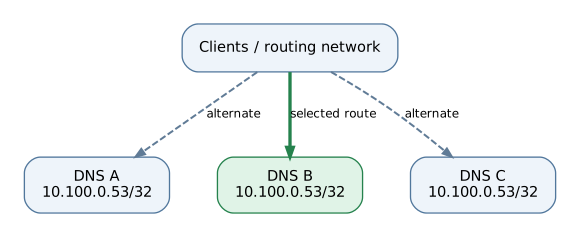
Anycast uses the same service IP on multiple hosts, with the routing system selecting which host receives traffic. For example, three DNS servers might all own 10.100.0.53/32 on dummy0:
sudo ip link add dummy0 type dummy
sudo ip addr add 10.100.0.53/32 dev dummy0
sudo ip link set dummy0 up
Each server advertises the prefix via its routing daemon. In FRRouting, the advertisement can include:
router bgp 65001
 address-family ipv4 unicast
  network 10.100.0.53/32
 exit-address-family
This assumes BGP neighbors are configured and the prefix exists in the relevant routing table. Routing preference is determined by routing policies and metrics; it is not necessarily geographic proximity.
A key failure mode is that the dummy interface stays up even when the DNS application fails. A production deployment must link route advertisement or withdrawal to service health. Anycast is particularly useful for stateless services such as DNS; stateful TCP sessions can break if routing shifts an active flow to another node.
5. VRRP and high availability

For a virtual IP on the same Ethernet subnet as clients, Keepalived/VRRP is often a better fit than an always-present dummy address. Consider:
- Server A:
192.168.1.10 - Server B:
192.168.1.11 - Floating VIP:
192.168.1.100
Example Keepalived configuration for Server A:
vrrp_instance VI_1 {
    state BACKUP
    interface eth0
    virtual_router_id 51
    priority 150
    advert_int 1

    virtual_ipaddress {
        192.168.1.100/24 dev eth0
    }
}
Server B uses compatible settings with a lower priority, for example 100. For a VIP on a directly attached subnet, assigning it to eth0 supports normal neighbor discovery. For routed service IPs, a dummy interface plus dynamic routing may be preferable. Keepalived configurations also need appropriate peer communication, health checks, and security controls for production use.
6. Create a dummy interface from C with libnl
The preferred implementation is a userspace management program using rtnetlink, not a new kernel network driver. Netlink messages include:
| Task | Message | Key attributes |
|---|---|---|
| Create interface | RTM_NEWLINK | IFLA_IFNAME, IFLA_LINKINFO, IFLA_INFO_KIND=dummy |
| Bring up | RTM_NEWLINK | IFF_UP |
| Add IP address | RTM_NEWADDR | IFA_LOCAL, IFA_ADDRESS |
| Add route | RTM_NEWROUTE | RTA_DST, RTA_GATEWAY, RTA_OIF |
| Add policy rule | RTM_NEWRULE | FRA_SRC, FRA_TABLE, FRA_PRIORITY |
| Delete interface | RTM_DELLINK | Interface identifier |
Install development packages:
sudo apt install libnl-3-dev libnl-route-3-dev pkg-config
Minimal implementation (cloop.c):
#include <stdio.h>
#include <net/if.h>
#include <sys/socket.h>
#include <netlink/netlink.h>
#include <netlink/socket.h>
#include <netlink/route/link.h>
#include <netlink/route/link/dummy.h>
#include <netlink/route/addr.h>
#include <netlink/addr.h>

int main(void)
{
    struct nl_sock *sock = nl_socket_alloc();
    struct rtnl_link *link = NULL, *change = NULL;
    struct rtnl_addr *addr = NULL;
    struct nl_addr *ip = NULL;
    int err = -1, index;

    if (!sock) return 1;
    err = nl_connect(sock, NETLINK_ROUTE);
    if (err < 0) goto out;

    link = rtnl_link_dummy_alloc();
    if (!link) { err = -NLE_NOMEM; goto out; }
    rtnl_link_set_name(link, "cloop0");
    err = rtnl_link_add(sock, link, NLM_F_CREATE | NLM_F_EXCL);
    if (err < 0) goto out;

    index = rtnl_link_name2i(sock, "cloop0");
    if (index <= 0) { err = -NLE_OBJ_NOTFOUND; goto out; }

    addr = rtnl_addr_alloc();
    if (!addr) { err = -NLE_NOMEM; goto out; }
    err = nl_addr_parse("10.255.0.1/32", AF_INET, &ip);
    if (err < 0) goto out;
    rtnl_addr_set_ifindex(addr, index);
    err = rtnl_addr_set_local(addr, ip);
    if (err < 0) goto out;
    err = rtnl_addr_add(sock, addr, 0);
    if (err < 0) goto out;

    change = rtnl_link_alloc();
    if (!change) { err = -NLE_NOMEM; goto out; }
    rtnl_link_set_flags(change, IFF_UP);
    err = rtnl_link_change(sock, link, change, 0);
    if (err < 0) goto out;

    puts("Created cloop0: 10.255.0.1/32");
out:
    if (err < 0) fprintf(stderr, "Netlink error: %s\n", nl_geterror(err));
    if (change) rtnl_link_put(change);
    if (ip) nl_addr_put(ip);
    if (addr) rtnl_addr_put(addr);
    if (link) rtnl_link_put(link);
    nl_socket_free(sock);
    return err < 0 ? 1 : 0;
}
Compile and run:
gcc cloop.c -o cloop $(pkg-config --cflags --libs libnl-3.0 libnl-route-3.0)
sudo ./cloop
ip -d link show cloop0
ip addr show cloop0
ping 10.255.0.1
The program requires CAP_NET_ADMIN in its network namespace. It intentionally uses NLM_F_EXCL, so rerunning it while cloop0 exists returns an error. This is a minimal demonstration: a production daemon should reconcile desired state, handle Netlink notifications, validate inputs, and roll back partially applied changes.
7. Do you need a kernel module?
Usually not. A kernel module using alloc_netdev() and register_netdev() can expose a new device, but it introduces kernel API compatibility and lifecycle concerns. A device built with ether_setup() is Ethernet-like, not an exact clone of Linux lo (ARPHRD_LOOPBACK with loopback-specific semantics).
Use existing device types unless you truly need new transmit/receive behavior:
| Requirement | Recommended mechanism |
|---|---|
| Stable router IP / Cisco-style Loopback | dummy |
| Custom source-based routing | ip rule / rtnetlink |
| BGP/OSPF control plane | FRRouting |
| Service anycast | dummy + BGP + health checks |
| Active/passive floating LAN VIP | Keepalived / VRRP |
| Userspace processing of IP packets | TUN |
| Virtual Ethernet frames in userspace | TAP |
| Routed path between hosts | GRE, IPIP, WireGuard, etc. |
| Novel device-specific kernel TX/RX semantics | Custom net_device driver |
8. Suggested architecture for a router-like product
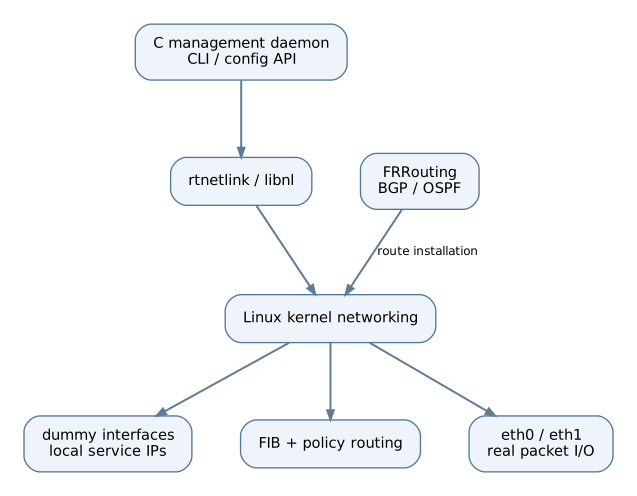
A clean Cisco-like management architecture has three layers:
- C management daemon: parses commands such as
interface Loopback0, stores desired configuration, creates dummy interfaces, assigns addresses, and watches rtnetlink notifications. - Linux kernel: owns the interfaces, local and forwarding routing tables, policy rules, and packet forwarding.
- FRRouting: implements BGP/OSPF, route advertisements, and convergence.
For example, a CLI command interface Loopback0 could map to dummy device lo0 or Loopback0; ip address 10.255.0.1/32 maps to RTM_NEWADDR; and routing protocol configuration is delegated to FRRouting.
This approach preserves the operational advantages of Cisco loopbacks without maintaining a custom kernel driver. The central rule is simple: dummy interfaces anchor addresses; physical interfaces and tunnels carry transit traffic.