Recovering Iomega Media in 2026: Building iomega_tools for Jaz, Zip, and QIC-122
Update: This post was created on August 9, 2026 and later expanded as the tooling and hardware tests evolved during August.
The story started with a simple problem: I still had useful SCSI hardware, but no convenient way to connect it to a modern machine.
That problem eventually led me to experiment with a BlueSCSI Ultra as a bridge to physical SCSI devices. I described that part of the project in From BlueSCSI Ultra to DaynaPORT: Connecting Legacy SCSI Devices to Linux and Windows.
Among the devices I was testing were Iomega Jaz drives.
Once the transport problem was mostly solved, another question appeared:
What can I actually do with old Iomega media once Linux can see the drive?
Mounting a filesystem is only part of the answer.
Old removable storage has its own failure modes, protection states, formatting behavior, vendor commands, damaged sectors, strange bridge interactions, and—in the case of old Iomega backup software—archive formats that modern systems do not understand.
That became the reason for iomega_tools.
Why Iomega media is still interesting
Zip and Jaz are good examples of a period when removable storage was not just a generic USB block device.
At the host level, the drives may look familiar:
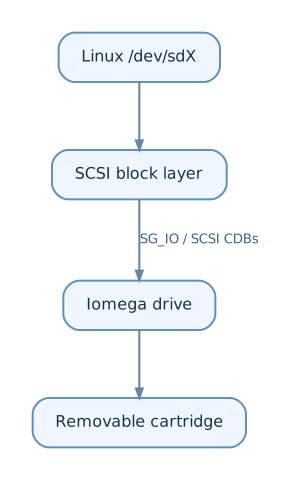
But there is more going on below the filesystem.
A drive can have:
- media protection modes,
- password-based locking,
- vendor-specific status pages,
- mechanical eject and load behavior,
- FORMAT UNIT behavior,
- firmware-specific command restrictions,
- bad sectors that stall a bridge instead of returning a clean SCSI error,
- and media layouts created by old Iomega software.
A modern Linux kernel can handle the ordinary block-device part.
For recovery work, however, I wanted to see and control the layer underneath it.
The project
The repository currently builds three independent tools:
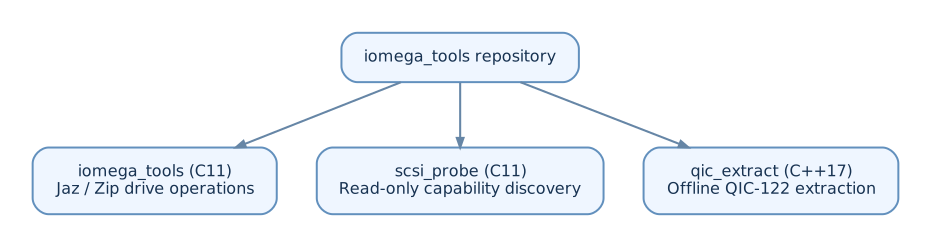
There was also an SG_IO tracing path during the reverse-engineering work.
The code is intentionally implemented as normal Linux userspace tooling. There is no custom kernel driver for Jaz or Zip. Commands are sent through the Linux SCSI generic interface using SG_IO.
That makes the project useful with more than one transport:
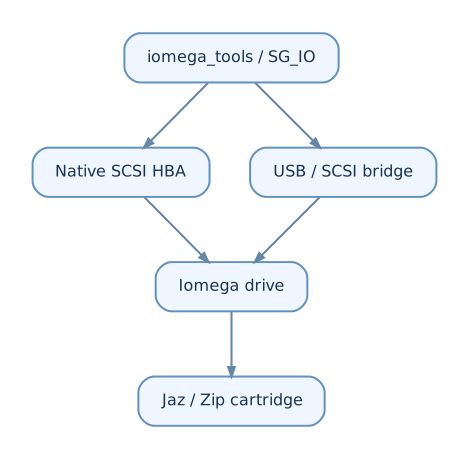
This was important for my setup because BlueSCSI Ultra was already being used as a path from a modern host to physical legacy SCSI hardware.
Starting with SCSI passthrough
The first layer is deliberately boring: identify the device, send commands, decode sense data, and avoid hiding failures.
For example:
sudo ./scsi_probe identify /dev/sdX
sudo ./scsi_probe explore /dev/sdX
scsi_probe is read-only. I use it when I want to understand what a device accepts before adding behavior to the main tool.
This became useful beyond Iomega itself. The probe code eventually grew better MMC decoding and DVD structure reporting as I kept using it against other SCSI-class devices.
But the original purpose was much simpler: find out what the Iomega hardware actually does.
Reading files without trusting the host mount path
For FAT-family media, iomega_tools can access the filesystem directly through FatFs.
That allows operations such as:
sudo ./iomega_tools list /dev/sdX -r
sudo ./iomega_tools get /dev/sdX README.TXT
sudo ./iomega_tools get /dev/sdX --all -o recovered
The get path supports FAT12, FAT16, FAT32 and exFAT directly.
Long filenames and subdirectories are supported, and filesystem detection does not assume that the filesystem starts at one hard-coded sector.
This matters because Iomega media can contain an MBR layout rather than a filesystem beginning at LBA 0.
The code recognizes both:

The traditional Iomega layout prefers partition table slot 4, but the tools do not require it.
Recover first, repair later
One of the main design rules is that inspection should be read-only unless I explicitly ask the program to modify the cartridge.
For example:
sudo ./iomega_tools verify /dev/sdX
verify combines several checks:
- drive and protection-state probing,
- filesystem consistency checking where a safe read-only checker exists,
- and a full read-only surface scan unless it is disabled.
Likewise:
sudo ./iomega_tools surface /dev/sdX
is read-only by default.
This is the behavior I want from a recovery tool. Before changing anything on old media, I want to know what can still be read.
When a bad sector is not just a bad sector
Old hardware behind a modern bridge produces failure modes that are easy to miss if software assumes a normal SATA or USB disk.
A large read may fail even though most of the requested sectors are fine.
The surface scanner therefore works in stages:
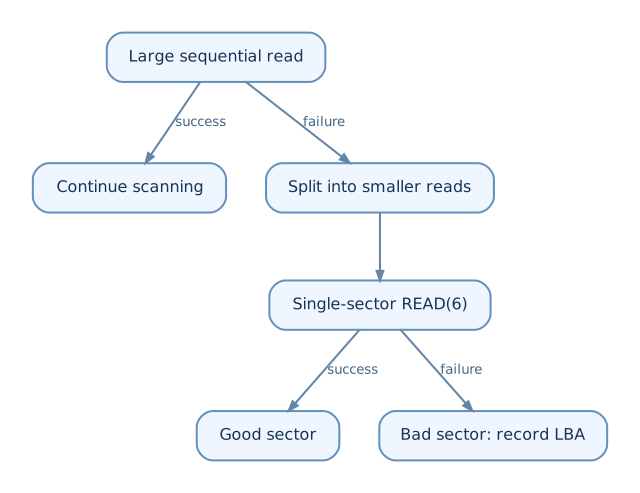
After a chunk failure, the scanner can fall back to single-sector reads for the remaining media.
This turned out to matter with USB-to-SCSI/IDE paths. One observed bridge configuration rejected large READ(10) transfers at roughly 240 sectors.
The tooling therefore cannot simply assume that a failed transfer means every sector inside that transfer is bad.
Recovering from a stalled bridge
There is an even less pleasant case: a failing data phase can leave the transport itself in a bad state.
Instead of receiving a nice SCSI CHECK CONDITION, the host may get an ioctl-level transport error.
The recovery path became:
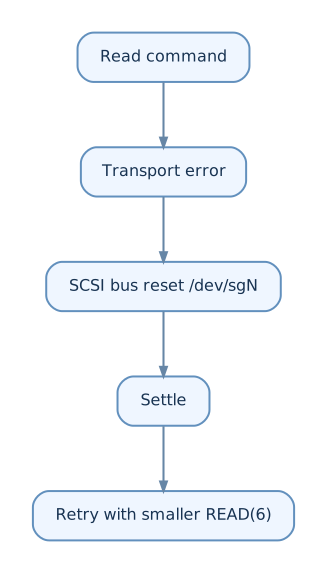
For USB storage, the reset can become a USB device reset so the bridge toggles the underlying drive reset line.
If the device node actually disappears with ENODEV, the scanner can force a USB re-enumeration and resume.
That sounds excessive for ordinary storage.
For recovering aging removable media through an adapter stack, it is extremely useful.
Capacity without READ CAPACITY
Another interesting hardware detail appeared while working with Zip.
Normally, a disk utility would ask a SCSI disk for its size using READ CAPACITY.
That assumption does not always work here.
The Zip drive I tested can reject READ CAPACITY with an illegal-request sense response.
So when the user does not specify the scan length, surface can determine the readable limit by probing the address space instead of depending entirely on the normal capacity command.
It is a small feature, but it captures an important theme of the project:
old hardware often works correctly according to its own assumptions, not ours.
Bad-sector registries instead of a private database
Finding damaged sectors is useful.
Preventing a filesystem from reusing them can be even more useful.
With an explicit:
sudo ./iomega_tools surface /dev/sdX --mark-bad
the tool can write bad locations into the filesystem's own bad-block mechanism.
The implementation is filesystem-specific:
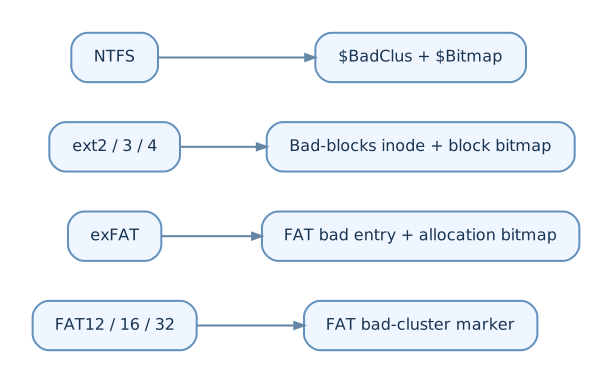
Metadata areas and already allocated data are protected from this operation.
Formats without an appropriate bad-block registry are refused.
This is intentionally not the default. --mark-bad modifies the media and requires write access.
Iomega protection modes
Another part of the project came from reverse-engineering IomegaWare behavior.
The drives support more than a simple writable/read-only switch.
The tool implements protection operations including:
- normal read/write,
- write protection,
- password-protected write access,
- password-based read/write lock,
- temporary unprotect,
- password removal.
For example:
sudo ./iomega_tools password /dev/sdX -w
sudo ./iomega_tools password /dev/sdX -rw -pw secret
sudo ./iomega_tools password /dev/sdX -u -pw secret
The password is carried in the vendor command parameter list, matching the behavior reconstructed from Iomega's old Linux tooling.
The same research also informed mount, umount, eject, status, and info.
Formatting was more complicated than expected
At first glance, formatting a Jaz or Zip cartridge sounds like:
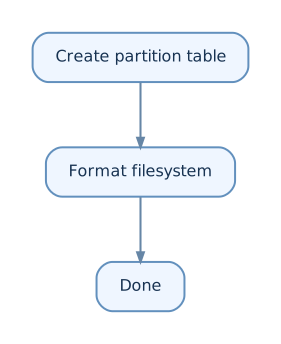
That is only the logical side.
The tool can create an Iomega-style MBR layout and invoke the appropriate Linux mkfs implementation:
sudo ./iomega_tools format /dev/sdX --fs fat16
Supported filesystem paths include FAT variants, exFAT, NTFS and ext filesystems.
But IomegaWare also has a drive-level long-format path.
That path sends a SCSI FORMAT UNIT command and then monitors the drive while the physical format is in progress.
Reverse-engineering the old Linux IomegaWare binaries exposed the command form and the progress calculation used by the original software.
Conceptually:
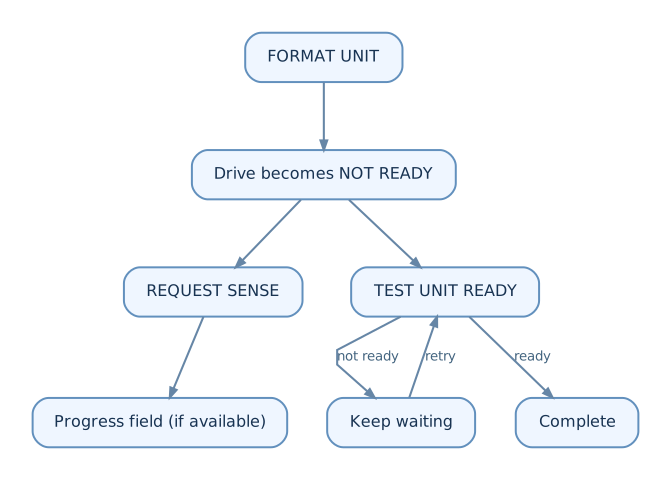
The distinction between logical formatting and a real drive-level format turned out to be important.
A BlueSCSI-specific surprise: sense data can disappear
This was one of the more interesting interactions between the Iomega project and my BlueSCSI work.
During a long format, the drive reports:
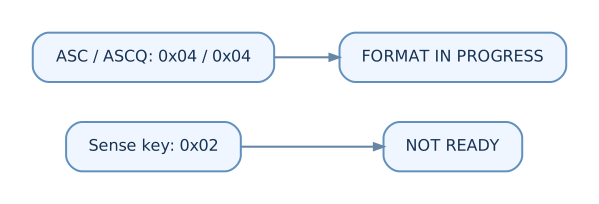
The format progress value lives in bytes 16-17 of fixed-format sense data.
The confusing observation was that BlueSCSI debug output could show the expected 04/04 sense data, while a later host-side REQUEST SENSE returned 00/00/00.
The repository notes explain why this is plausible.
In initiator mode, BlueSCSI can issue REQUEST SENSE internally after a command returns CHECK CONDITION. The bridge consumes and acts on that sense data, but it does not necessarily preserve it for a later REQUEST SENSE from the Linux host.
So the path can look like this:
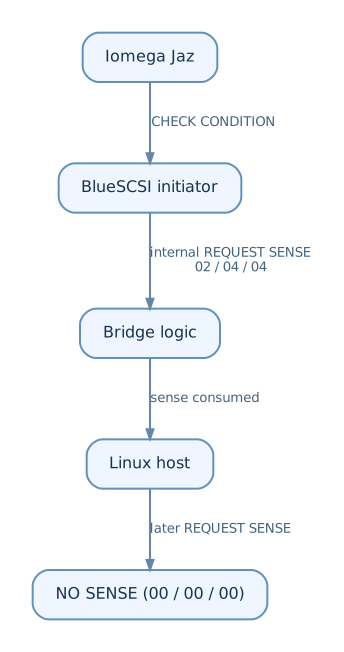
That changed the implementation.
TEST UNIT READY became the reliable completion condition, while REQUEST SENSE is used for progress information when it is available.
This is exactly the kind of issue that appears only when several old and new protocol layers are stacked together.
What IomegaWare was still useful for
I did not want to copy the original tooling.
I wanted to recover protocol facts.
The old IomegaWare for Linux binaries were therefore used as reverse-engineering reference material.
The work exposed details such as:
- the drive-level
FORMAT UNITcommand, - the 4-byte format parameter list,
- progress calculation from REQUEST SENSE,
- which drive classes are allowed to perform a long format,
- protection state encoding,
- the vendor protection command,
- mount/unmount/eject sequencing.
The implementation in this repository is original C/C++ code built from those observed protocol behaviors.
This distinction matters both technically and legally: old proprietary binaries are reference material, not project dependencies.
qic_extract: recovering old Iomega backup archives
The third program in the repository solves a different problem.
Even if the disk itself is readable, old backup software may have stored the useful data inside a QIC-122 archive.
qic_extract operates on an image or archive file rather than directly on the SCSI device:
./qic_extract analyze backup.qic
./qic_extract list backup.qic
./qic_extract extract backup.qic -o recovered
The reverse-engineered format contains structures such as:
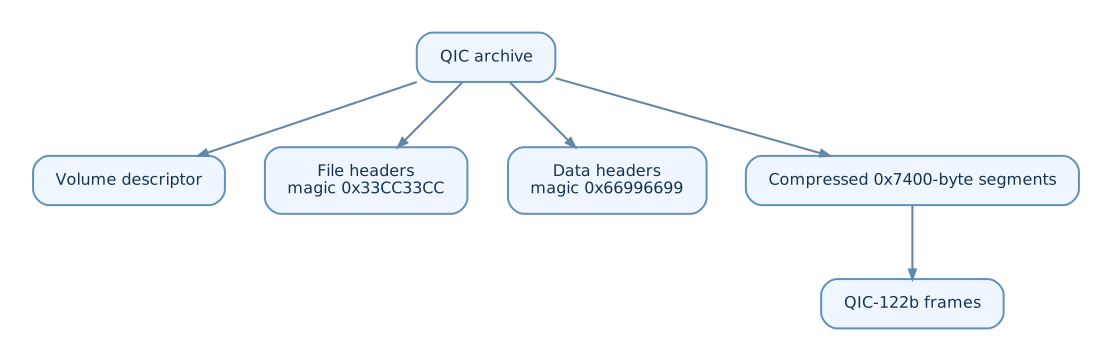
The compressed path includes a custom bitstream decoder, segment-chain handling, and UTF-16 filename recovery.
I find this part of the project particularly interesting because it shows that recovering an old cartridge can involve several independent layers:
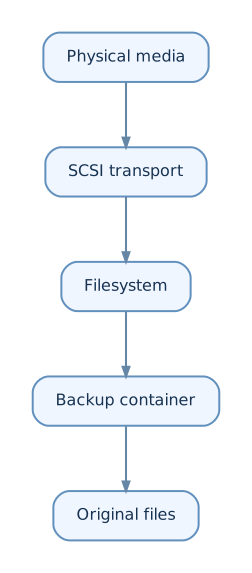
Being able to read the disk is not the same as being able to recover the files that a user originally stored.
The commit history tells the real story
The repository was created on August 9, 2026 with the three main tools already separated:
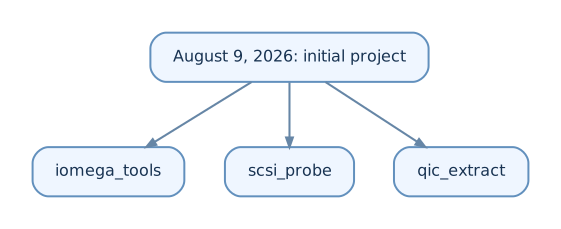
The first commit also included the SCSI passthrough layer, filesystem work, QIC extraction, tests, and the SG_IO tracing infrastructure.
Later the same day the project gained more practical recovery features: image/benchmark streaming, wildcard file recovery, additional filesystem formatting support, and ATA SMART probing through SAT.
The next rounds of work came directly from hardware behavior:
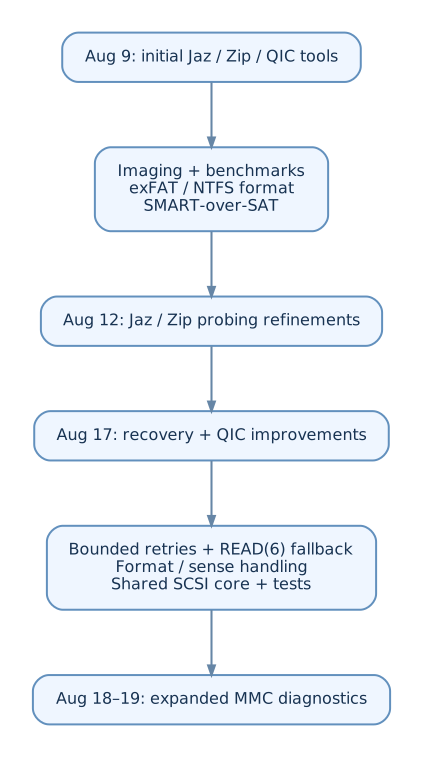
This is one reason I like keeping experimental work in git.
The interesting history is not just "feature A was added."
It shows which assumptions failed when the code met real hardware.
The relationship with the BlueSCSI project
The BlueSCSI work and iomega_tools solve different halves of the same problem.
BlueSCSI Ultra gave me a practical way to connect physical legacy SCSI hardware when I did not have a suitable vintage host adapter.
iomega_tools deals with what happens after that connection exists.
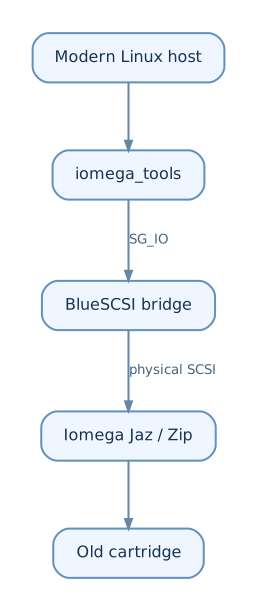
The DaynaPORT project pushed the bridge in another direction: transporting Ethernet frames over SCSI.
The Iomega project pushes it toward storage recovery and hardware diagnostics.
Together they turned BlueSCSI Ultra from something I originally associated with SCSI emulation into a much more interesting laboratory for real legacy hardware.
Current workflow
For an unknown old cartridge, my preferred workflow is conservative.
First identify the drive:
sudo ./scsi_probe identify /dev/sdX
Then inspect the media:
sudo ./iomega_tools info /dev/sdX
sudo ./iomega_tools list /dev/sdX -r
If the filesystem is readable, recover the files:
sudo ./iomega_tools get /dev/sdX --all -o recovered
Then perform a read-only check:
sudo ./iomega_tools verify /dev/sdX
For questionable media, perform an explicit surface scan or image it before attempting repair.
Only after recovery would I consider write operations such as formatting or marking bad blocks.
That ordering is intentional:
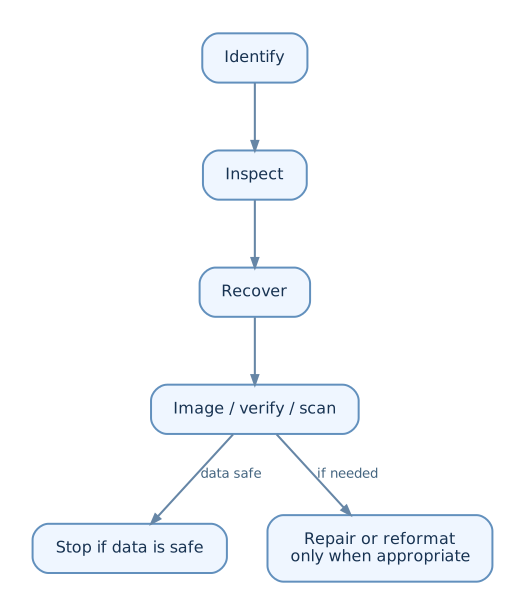
Old removable media is not the place for optimistic automation.
What I learned
A few conclusions from the project are broader than Iomega.
First, SCSI passthrough is still extremely useful. A modern kernel provides the infrastructure needed to investigate devices that were designed decades ago.
Second, a bridge is part of the protocol path. It can impose transfer limits, transform errors, consume sense data, reset hardware, or disappear during a failed command.
Third, filesystem recovery and device recovery are different problems. A perfectly valid FAT parser cannot help if the transport stalls on one physical sector.
Fourth, old vendor tools are valuable documentation when the real protocol documentation is incomplete or difficult to find.
And finally, the safest recovery feature is usually the one that does not write anything.
That is why iomega_tools started as a collection of low-level experiments and gradually became a recovery toolkit.
The code is available in the iomega_tools repository.